This will be the last post in the documenting with PowerShell series for a short while. I’ve enjoyed the series thoroughly but there are so many choices to blog about and I want to take a short break to be able to prepare the next series with all the requests I’ve been getting.
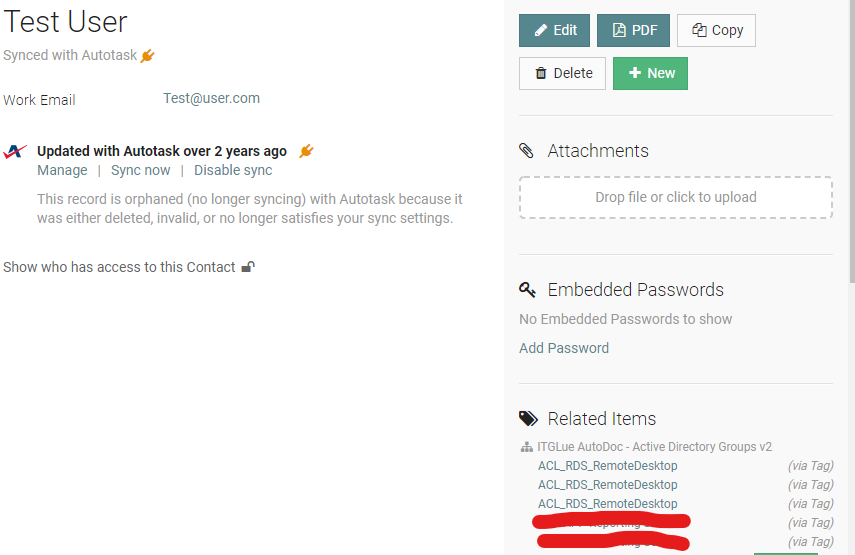
This time we will get al the current active directory groups, list all users in these groups, and even attach the contact as a tagged resource in IT-Glue. This way, you can look up a specific contact and find that exactly in which groups they’ve been added. It’s also pretty cool to combine this script with the previous blog found here.
The script
     #####################################################################
    $APIKEy =  "APIKEYHERE"
    $APIEndpoint = "https://api.eu.itglue.com"
    $orgID = "ORGIDHERE"
    #Tag related devices. this will try to find the devices based on the MAC, Connected to this network, and tag them as related devices.
    $FlexAssetName = "ITGLue AutoDoc - Active Directory Groups v2"
    $Description = "Lists all groups and users in them."
    #####################################################################
    If(Get-Module -ListAvailable -Name "ITGlueAPI") {Import-module ITGlueAPI} Else { install-module ITGlueAPI -Force; import-module ITGlueAPI}
    #Settings IT-Glue logon information
    Add-ITGlueBaseURI -base_uri $APIEndpoint
    Add-ITGlueAPIKey $APIKEy
    #Collect Data
    $AllGroups = get-adgroup -filter *
    foreach($Group in $AllGroups){
$Contacts = @()
    $Members = get-adgroupmember $Group
    $MembersTable = $members | Select-Object Name, distinguishedName | ConvertTo-Html -Fragment | Out-String
    foreach($Member in $Members){

    $email = (get-aduser $member -Properties EmailAddress).EmailAddress
    #Tagging devices
            if($email){
            Write-Host "Finding all related contacts - Based on email: $email"
            $Contacts += (Get-ITGlueContacts -page_size "1000" -filter_primary_email $email).data
            }
    }
    $FlexAssetBody =
    @{
        type = 'flexible-assets'
        attributes = @{
                name = $FlexAssetName
                traits = @{
                    "group-name" = $($group.name)
                    "members" = $MembersTable
                    "guid" = $($group.objectguid.guid)
                    "tagged-users" = $Contacts.id
                }
        }
    }
    #Checking if the FlexibleAsset exists. If not, create a new one.
    $FilterID = (Get-ITGlueFlexibleAssetTypes -filter_name $FlexAssetName).data
    if(!$FilterID){
        $NewFlexAssetData =
        @{
            type = 'flexible-asset-types'
            attributes = @{
                    name = $FlexAssetName
                    icon = 'sitemap'
                    description = $description
            }
            relationships = @{
                "flexible-asset-fields" = @{
                    data = @(
                        @{
                            type       = "flexible_asset_fields"
                            attributes = @{
                                order           = 1
                                name            = "Group Name"
                                kind            = "Text"
                                required        = $true
                                "show-in-list"  = $true
                                "use-for-title" = $true
                            }
                        },
                        @{
                            type       = "flexible_asset_fields"
                            attributes = @{
                                order          = 2
                                name           = "Members"
                                kind           = "Textbox"
                                required       = $false
                                "show-in-list" = $true
                            }
                        },
                        @{
                            type       = "flexible_asset_fields"
                            attributes = @{
                                order          = 3
                                name           = "GUID"
                                kind           = "Text"
                                required       = $false
                                "show-in-list" = $false
                            }
                        },
                        @{
                            type       = "flexible_asset_fields"
                            attributes = @{
                                order          = 4
                                name           = "Tagged Users"
                                kind           = "Tag"
                                "tag-type"     = "Contacts"
                                required       = $false
                                "show-in-list" = $false
                            }

                        }
                    )
                    }
                }

           }
    New-ITGlueFlexibleAssetTypes -Data $NewFlexAssetData
    $FilterID = (Get-ITGlueFlexibleAssetTypes -filter_name $FlexAssetName).data
    }
    #Upload data to IT-Glue. We try to match the Server name to current computer name.
    $ExistingFlexAsset = (Get-ITGlueFlexibleAssets -filter_flexible_asset_type_id $Filterid.id -filter_organization_id $orgID).data | Where-Object {$_.attributes.traits.'group-name' -eq $($group.name)}
    #If the Asset does not exist, we edit the body to be in the form of a new asset, if not, we just upload.
    if(!$ExistingFlexAsset){
    $FlexAssetBody.attributes.add('organization-id', $orgID)
    $FlexAssetBody.attributes.add('flexible-asset-type-id', $FilterID.id)
    Write-Host "Creating new flexible asset"
    New-ITGlueFlexibleAssets -data $FlexAssetBody
    } else {
    Write-Host "Updating Flexible Asset"
    $ExistingFlexAsset = $ExistingFlexAsset[-1]
    Set-ITGlueFlexibleAssets -id $ExistingFlexAsset.id  -data $FlexAssetBody}
    }
And that’s it. This will help you document all your security and distribution groups. You’ll even see them in the contact sidebar, so you have a quick overview what user is in what groups.
 And that’s it! as always, Happy PowerShelling.