This script was requested by a friend of mine. She had trouble keeping her IP address management under control. A lot of changes on super and subscopes within networks caused her to lose oversight and she was wondering if there wasn’t a clean and automated way of generating documentation for this.
But before we dive into that script, I want to let you all know that the AzGlue function to protect, and help circumvent rate limitations for IT-Glue has been updated. Angus Warren made an amazing update. He added loads of functionality and security measures. If you are using AzGlue right now, I’d suggest to update to the latest version.
Angus his changes have updated the function entirely, and it’s practically a new product all together. I’ll be updating the documentation for this in the coming weeks.
The scripts
So, now let’s get to the scripts, I am sharing two versions again. One for IT-Glue, and one generic HTML version. The IT-Glue version creates the flexible asset for you at first run, and then documents the DHCP settings.
IT-Glue version
You can run this version by hand, using your RMM, or from a scheduled task.
###############
$ITGkey = "YOURIGLUEKEY"
$ITGbaseURI = "https://api.eu.itglue.com"
$FlexAssetName = "DHCP Server - Autodoc"
$ITGlueOrgID = "ITGLUEORGID"
$Description = "A logbook for DHCP server witha ll information about scopes, superscopes, etc.."
##############
#Settings IT-Glue logon information
If (Get-Module -ListAvailable -Name "ITGlueAPI") {
    Import-module ITGlueAPI
}
Else {
    Install-Module ITGlueAPI -Force
    Import-Module ITGlueAPI
}
#Settings IT-Glue logon information
Add-ITGlueBaseURI -base_uri $ITGbaseURI
Add-ITGlueAPIKey $ITGkey

write-host "Checking if Flexible Asset exists in IT-Glue." -foregroundColor green
$FilterID = (Get-ITGlueFlexibleAssetTypes -filter_name $FlexAssetName).data
if (!$FilterID) {
write-host "Does not exist, creating new." -foregroundColor green
$NewFlexAssetData =
@{
type = 'flexible-asset-types'
attributes = @{
name = $FlexAssetName
icon = 'sitemap'
description = $description
}
relationships = @{
"flexible-asset-fields" = @{
data = @(
@{
type = "flexible_asset_fields"
attributes = @{
order = 1
name = "DHCP Server Name"
kind = "Text"
required = $true
"show-in-list" = $true
"use-for-title" = $true
}
},
@{
type = "flexible_asset_fields"
attributes = @{
order = 2
name = "DHCP Server Settings"
kind = "Textbox"
required = $false
"show-in-list" = $false
}
},
@{
type = "flexible_asset_fields"
attributes = @{
order = 3
name = "DHCP Server Database Information"
kind = "Textbox"
required = $false
"show-in-list" = $false
}
},
@{
type = "flexible_asset_fields"
attributes = @{
order = 4
name = "DHCP Domain Authorisation"
kind = "Textbox"
required = $false
"show-in-list" = $false
}
},
@{
type = "flexible_asset_fields"
attributes = @{
order = 5
name = "DHCP Scopes"
kind = "Textbox"
required = $false
"show-in-list" = $false
}
},
@{
type = "flexible_asset_fields"
attributes = @{
order = 6
name = "DHCP Scope Information"
kind = "Textbox"
required = $false
"show-in-list" = $false
}
},
@{
type = "flexible_asset_fields"
attributes = @{
order = 7
name = "DHCP Statistics"
kind = "Textbox"
required = $false
"show-in-list" = $false
}
}
)
}
}
}
New-ITGlueFlexibleAssetTypes -Data $NewFlexAssetData
$FilterID = (Get-ITGlueFlexibleAssetTypes -filter_name $FlexAssetName).data
}

write-host "Starting documentation process." -foregroundColor green

$DCHPServerSettings = Get-DhcpServerSetting | select-object ActivatePolicies, ConflictDetectionAttempts, DynamicBootp, IsAuthorized, IsDomainJoined, NapEnabled, NpsUnreachableAction, RestoreStatus | ConvertTo-Html -Fragment -PreContent "<h1>DHCP Server Settings</h1>" | Out-String
$databaseinfo = Get-DhcpServerDatabase | Select-Object BackupInterval, BackupPath, CleanupInterval, FileName, LoggingEnabled, RestoreFromBackup | ConvertTo-Html -Fragment -PreContent "<h1>DHCP Database information</h1>" | Out-String
$DHCPDCAuth = Get-DhcpServerInDC | select-object IPAddress, DnsName  | ConvertTo-Html -Fragment -PreContent "<h1>DHCP Domain Controller Authorisations</h1>" | Out-String
$Scopes = Get-DhcpServerv4Scope
$ScopesAvailable = $Scopes | Select-Object ScopeId, SubnetMask, StartRange, EndRange, ActivatePolicies, Delay, Description, LeaseDuration, MaxBootpClients, Name, NapEnable, NapProfile, State, SuperscopeName, Type | ConvertTo-Html -Fragment -PreContent "<h1>DHCP Server scopes</h1>" | Out-String
$ScopeInfo = foreach ($Scope in $scopes) {
    $scope | Get-DhcpServerv4Lease | select-object ScopeId, IPAddress, AddressState, ClientId, ClientType, Description, DnsRegistration, DnsRR, HostName, LeaseExpiryTime |  ConvertTo-Html -Fragment -PreContent "<h1>Scope Information: $($Scope.name) - $($scope.ScopeID) </h1>" | Out-String
}

$DHCPServerStats = Get-DhcpServerv4Statistics | Select-Object InUse, Available, Acks, AddressesAvailable, AddressesInUse, Declines, DelayedOffers, Discovers, Naks, Offers, PendingOffers, PercentageAvailable, PercentageInUse, PercentagePendingOffers, Releases, Requests, ScopesWithDelayConfigured, ServerStartTime, TotalAddresses, TotalScope | ConvertTo-Html -Fragment -PreContent "<h1>DHCP Server statistics</h1>" -As List | Out-String

write-host "Uploading to IT-Glue." -foregroundColor green
$FlexAssetBody = @{
    type       = 'flexible-assets'
    attributes = @{
        traits = @{
            'dhcp-server-name'                 = $env:computername
            'dhcp-server-settings'             = $DCHPServerSettings
            'dhcp-server-database-information' = $databaseinfo
            'dhcp-domain-authorisation'        = $DHCPDCAuth
            'dhcp-scopes'                      = $ScopesAvailable
            'dhcp-scope-information'           = $ScopeInfo
            'dhcp-statistics'                  = $DHCPServerStats
        }
    }
}
write-host "Documenting to IT-Glue"  -ForegroundColor Green
$ExistingFlexAsset = (Get-ITGlueFlexibleAssets -filter*flexible_asset_type_id $($filterID.ID) -filter_organization_id $ITGlueOrgID).data | Where-Object { $*.attributes.traits.'dhcp-server-name' -eq $env:computername }

#If the Asset does not exist, we edit the body to be in the form of a new asset, if not, we just upload.
if (!$ExistingFlexAsset) {
    $FlexAssetBody.attributes.add('organization-id', $ITGlueOrgID)
    $FlexAssetBody.attributes.add('flexible-asset-type-id', $($filterID.ID))
write-host " Creating DHCP Server Log into IT-Glue organisation $ITGlueOrgID" -ForegroundColor Green
New-ITGlueFlexibleAssets -data $FlexAssetBody
}
else {
write-host " Editing DHCP Server Log into IT-Glue organisation $ITGlueOrgID" -ForegroundColor Green
$ExistingFlexAsset = $ExistingFlexAsset | select-object -last 1
Set-ITGlueFlexibleAssets -id $ExistingFlexAsset.id -data $FlexAssetBody
}
Generic version
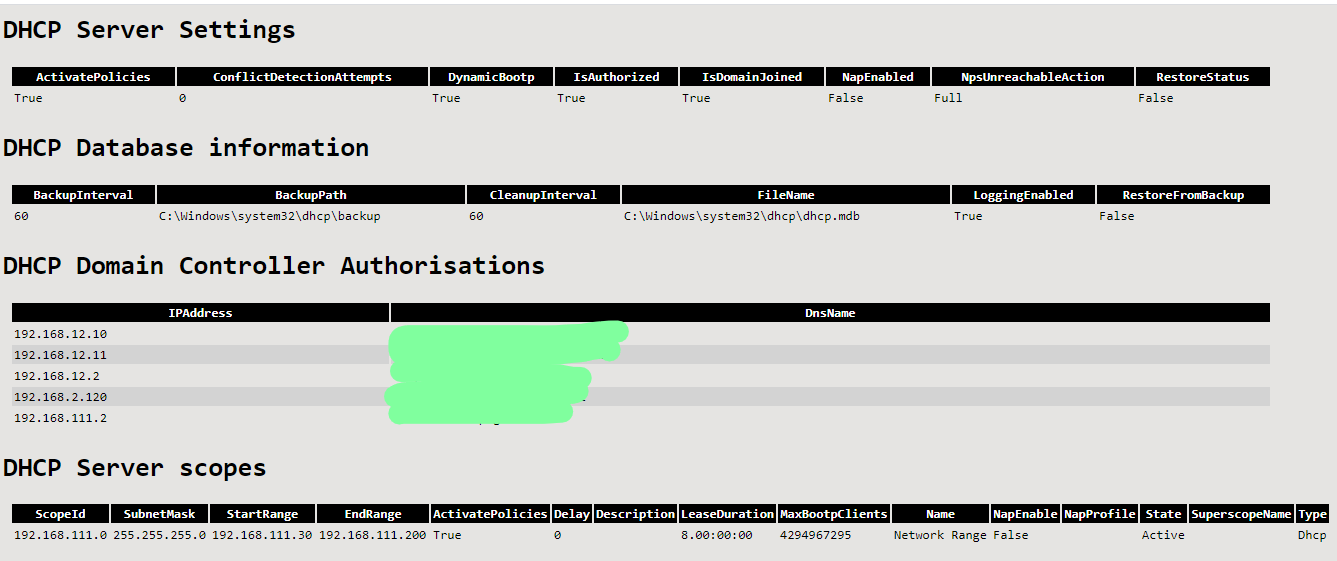
As requested for the generic version I’ve included a screenshot of the end results:
 ```powershell ############### $TableStyling = “
"background-color:#4CAF50">”
##############
write-host “Starting documentation process.” -foregroundColor green
$head = @"
$DCHPServerSettings = Get-DhcpServerSetting | select-object ActivatePolicies,ConflictDetectionAttempts,DynamicBootp,IsAuthorized,IsDomainJoined,NapEnabled,NpsUnreachableAction,RestoreStatus | ConvertTo-Html -Fragment -PreContent “
DHCP Server Settings
” | Out-String $databaseinfo = Get-DhcpServerDatabase | Select-Object BackupInterval,BackupPath,CleanupInterval,FileName,LoggingEnabled,RestoreFromBackup | ConvertTo-Html -Fragment -PreContent “DHCP Database information
” | Out-String $DHCPDCAuth = Get-DhcpServerInDC | select-object IPAddress,DnsName |ConvertTo-Html -Fragment -PreContent “DHCP Domain Controller Authorisations
” | Out-String $Scopes = Get-DhcpServerv4Scope $ScopesAvailable = $Scopes | Select-Object ScopeId,SubnetMask,StartRange,EndRange,ActivatePolicies,Delay,Description,LeaseDuration,MaxBootpClients,Name,NapEnable,NapProfile,State,SuperscopeName,Type | ConvertTo-Html -Fragment -PreContent “DHCP Server scopes
” | Out-String $ScopeInfo = foreach ($Scope in $scopes) { $scope | Get-DhcpServerv4Lease | select-object ScopeId, IPAddress, AddressState, ClientId, ClientType, Description, DnsRegistration, DnsRR, HostName, LeaseExpiryTime | ConvertTo-Html -Fragment -PreContent “Scope Information: $($Scope.name) - $($scope.ScopeID)
” | Out-String }$DHCPServerStats = Get-DhcpServerv4Statistics | Select-Object InUse,Available,Acks,AddressesAvailable,AddressesInUse,Declines,DelayedOffers,Discovers,Naks,Offers,PendingOffers,PercentageAvailable,PercentageInUse,PercentagePendingOffers,Releases,Requests,ScopesWithDelayConfigured,ServerStartTime,TotalAddresses,TotalScope | ConvertTo-Html -Fragment -PreContent “
DHCP Server statistics
” -As List | Out-String$head, $DCHPServerSettings, $databaseinfo, $DHCPDCAuth, $ScopesAvailable,$ScopeInfo,$DHCPServerStats | out-file “C:\Temp\Auditoutput.html”
And that’s it! Nicole is now using this script to document her DHCP servers, and so can you. As always, Happy PowerShelling.
Recent Articles
Last week I watched Merill Fernando talk to Alex Pavlovsky and Marilee Tuscak from the Entra team about something I’d kinda put under the “needs a GSA licence” branch and i’d check it out later, turns out that like most people, I half-assed the documentation and it turns out it doesn’t. There’s two features that come with any P1 license; Compliant network check and Source IP Restoration. So BP, P1, or even frontline worker licenses already have this.
We’re Joining #IntuneForMSPs 🎉
Being invited by Microsoft to join a global initiative is a big moment for us, and we want to be clear about why it matters. #IntuneForMSPs is Microsoft’s program to help MSPs deliver Microsoft 365, Intune, and Copilot services at scale, and CIPP is now part of it, bringing the largest MSP community in the channel directly to Microsoft.
CyberDrain CTF returns! (and so do I!)
It’s been since september that I actually picked up a digital pen equivalent and wrote anything down. This was due to me being busy with life but also my side projects like CIPP. I’m trying to get back into the game of scripting and blogging about these scripts. There’s still so much to automate and so little time, right? ;)